schinge
Senior-Moderator
Teammitglied
- 14.851
offizielle Ankündigung
OTA Images
Full OTA Images for Nexus and Pixel Devices | Google Play services | Google Developers
Warum findet mein Telefon kein Update?
Die OTA-Updates werden z.T. erst später freigeschaltet.
Warum dauert das Update so lange?
Das Pixel hat zwei Partitionen, das Betriebssystem ist quasi doppelt im Speicher.
Wenn ein Update kommt, wird es auf die nicht verwendete Partition aufgespielt.
Anschließend werden Apps/Einstellungen von der aktiven Partition mit der bislang nicht verwendeten abgeglichen.
Schließlich wird der Cache aller Apps zurückgesetzt (Optimierung).
Wenn das alles erledigt ist, wird man zum Neustart aufgefordert.
Dabei wird dann auf die bislang nicht verwendete Partition mit erfolgtem Update umgeschaltet.
Damit man das Telefon währenddessen weiter nutzen kann, passiert das alles im Hintergrund mit niedriger Priorität.
Deshalb dauert es, und deshalb ist es egal, ob das Update nur ein kB oder mehrere MB groß ist.
Denn nicht die Änderung dauert, sondern das danach.
Der Vorteil ist, läuft beim Update etwas schief, kann auf die Version vor dem Update umgeschaltet werden.
Tipp: Wenn ein Update kommt, Abends ans Netzteil, Update starten und am nächsten Morgen neu starten.
Momentan arbeitet Google aber an der Update-Prozedur, damit die Updates schneller installiert werden.
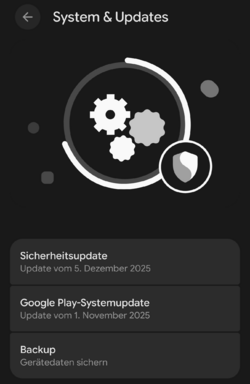
Warum ist der Google Play Sicherheitsstand nicht aktuell?
Das Google-Play-Systemupdate ist unabhängig vom monatlichen Pixel-Sicherheitsupdate.
Es ist also durchaus normal, wenn der Google Play Sicherheitsstand älter ist!
Google Pixel Update – Dezember 2025Google Pixel-Update – Dezember 2025
We have started to roll out the monthly software update for December 2025. All supported Pixel devices running Android 16 will receive these software updates starting today, and the rollout will continue over the next week in phases, depending on carrier and device. You will receive a notification once the system update is available for your device. We encourage you to check your Android version and update to receive the latest software.
Details of this month’s security fixes can be found on the Pixel Security Bulletin: https://source.android.com/docs/security/bulletin/pixel
Thanks,
Google Pixel Support Team
Software versions
Global
- Pixel 6: BP4A.251205.006
- Pixel 6 Pro: BP4A.251205.006
- Pixel 6a: BP4A.251205.006
- Pixel 7: BP4A.251205.006
- Pixel 7 Pro: BP4A.251205.006
- Pixel Tablet: BP4A.251205.006
- Pixel Fold: BP4A.251205.006
- Pixel 8: BP4A.251205.006
- Pixel 8 Pro: BP4A.251205.006
- Pixel 8a: BP4A.251205.006
- Pixel 9: BP4A.251205.006
- Pixel 9 Pro: BP4A.251205.006
- Pixel 9 Pro XL: BP4A.251205.006
- Pixel 9 Pro Fold: BP4A.251205.006
- Pixel 9a: BP4A.251205.006
- Pixel 10: BP4A.251205.006
- Pixel 10 Pro: BP4A.251205.006
- Pixel 10 Pro XL: BP4A.251205.006
- Pixel 10 Pro Fold: BP4A.251205.006
EMEA
- Pixel 9: BP4A.251205.006.A1
- Pixel 9 Pro: BP4A.251205.006.A1
- Pixel 9 Pro XL: BP4A.251205.006.A1
- Pixel 9 Pro Fold: BP4A.251205.006.A1
- Pixel 10: BP4A.251205.006.A1
- Pixel 10 Pro: BP4A.251205.006.A1
- Pixel 10 Pro XL: BP4A.251205.006.A1
- Pixel 10 Pro Fold: BP4A.251205.006.A1
Japan
- Pixel 9a: BP4A.251205.006.C1
- Pixel 10: BP4A.251205.006.C1
- Pixel 10 Pro: BP4A.251205.006.C1
- Pixel 10 Pro XL: BP4A.251205.006.C1
- Pixel 10 Pro Fold: BP4A.251205.006.C1
Verizon
- Pixel 9a: BP4A.251205.006.B1
What’s included
The December 2025 update includes bug fixes and improvements for Pixel users – see below for details
Audio
- Fix for issue occasionally causing audio crashes*[3]
Battery & Charging
- Fix for an issue where the battery icon displays a blank or question mark ("?") on the status bar in certain conditions*[1]
- Fix for an issue where the battery's 80% charge limit setting may be incorrect in certain conditions*[1]
Bluetooth
- Fix for issue occasionally preventing connection with certain Bluetooth devices or accessories*[1]
Camera
- General improvements for camera stability under certain conditions*[3]
Display & Graphics
- Fix for an issue that causes the screen to flash or remain black in certain conditions*[4]
- Fix for an issue that causes the screen to occasionally hang or freeze in certain conditions*[4]
- Fix for an issue where the screen brightness becomes dim and requires toggling the screen off and on to restore normal brightness in certain conditions*[4]
- Fix for an issue where the screen does not immediately respond when attempting to unlock from the Always-On Display*[1]
- Fix for the inner display of Pixel Foldable devices flickering or going black when launching certain games in certain conditions*[5]
- Fix for an issue causing screen freezes and display corruption in certain conditions*[3]
Framework
- Fix for an issue with toggling the "Extra Dim" Quick Settings tile in certain conditions*[1]
- Fix for an issue where the system could run out of memory due to splash screens not closing properly in certain conditions*[1]
- Fix for issue with stability when using Picture-in-Picture mode during display changes in certain conditions*[1]
- General improvements for system stability and performance in certain conditions*[1]
Sensors
- Fix for stability issues caused by memory allocation failures in sensor-related features under certain conditions*[1]
System
- General improvements for system stability and performance in certain conditions*[1]
Telephony
- Fix for issues causing instability and intermittent problems with emergency calling functionality under certain conditions*[6]
- General improvements for network connection stability and performance in certain conditions*[1]
Touch
- Fix for issues causing fingerprint unlock to fail under certain conditions*[3]
User Interface
- Fix for an issue that causes the keyboard to sometimes flicker or fail to appear when searching in the app drawer*[1]
- Fix for an issue with Google Home controls launch as a blank screen in certain conditions*[1]
- Fix for an issue with screen freezing when using gesture navigation or app switching in certain conditions*[1]
- Fix for issue where message notification sounds are sometimes not playing in certain conditions*[1]
- Fix for issue with layouts and animations during transitions in certain conditions*[1]
- Fix for issue with overlapping UI elements in the notification shade in certain conditions*[1]
- Fix for issue with semi-transparent background remains on the screen after launching the camera via a double-press of the power button in certain conditions*[1]
- Fix for issue with swipe-up gestures failing to trigger overview or exit apps in certain conditions*[1]
- Fix for issues with Quick Settings (QS) shade in certain conditions*[1]
- Fix for System UI crashing when interacting with notification onboarding buttons in certain conditions*[1]
- Fix for the issue where the notification shade sometimes incorrectly display the quick settings shelf instead of notifications after unlocking the screen*[1]
- General improvements for performance and stability in certain UI transitions and animations*[1]
Wi-Fi
- Fix to improve Wi-Fi connectivity stability and performance in certain conditions*[2]
------------------------------------------------------------------------------------------------------
Device Applicability
Fixes are available for all supported Pixel devices unless otherwise indicated below. Some fixes may be carrier/region specific.
*[1] Pixel 6, Pixel 6 Pro, Pixel 6a, Pixel 7, Pixel 7 Pro, Pixel 8, Pixel 8 Pro, Pixel 8a, Pixel Fold, Pixel Tablet, Pixel 9, Pixel 9 Pro, Pixel 9 Pro XL, Pixel 9 Pro Fold, Pixel 9a, Pixel 10, Pixel 10 Pro, Pixel 10 Pro XL
*[2] Pixel 8, Pixel 8 Pro, Pixel 8a
*[3] Pixel 9, Pixel 9 Pro, Pixel 9 Pro XL, Pixel 9 Pro Fold, Pixel 9a, Pixel 10, Pixel 10 Pro, Pixel 10 Pro XL, Pixel 10 Pro Fold
*[4] Pixel 10, Pixel 10 Pro, Pixel 10 Pro XL, Pixel 10 Pro Fold
*[5] Pixel 10 Pro Fold
*[6] Pixel 6, Pixel 6 Pro, Pixel 6a
OTA Images
Full OTA Images for Nexus and Pixel Devices | Google Play services | Google Developers
Warum findet mein Telefon kein Update?
Die OTA-Updates werden z.T. erst später freigeschaltet.
Warum dauert das Update so lange?
Das Pixel hat zwei Partitionen, das Betriebssystem ist quasi doppelt im Speicher.
Wenn ein Update kommt, wird es auf die nicht verwendete Partition aufgespielt.
Anschließend werden Apps/Einstellungen von der aktiven Partition mit der bislang nicht verwendeten abgeglichen.
Schließlich wird der Cache aller Apps zurückgesetzt (Optimierung).
Wenn das alles erledigt ist, wird man zum Neustart aufgefordert.
Dabei wird dann auf die bislang nicht verwendete Partition mit erfolgtem Update umgeschaltet.
Damit man das Telefon währenddessen weiter nutzen kann, passiert das alles im Hintergrund mit niedriger Priorität.
Deshalb dauert es, und deshalb ist es egal, ob das Update nur ein kB oder mehrere MB groß ist.
Denn nicht die Änderung dauert, sondern das danach.
Der Vorteil ist, läuft beim Update etwas schief, kann auf die Version vor dem Update umgeschaltet werden.
Tipp: Wenn ein Update kommt, Abends ans Netzteil, Update starten und am nächsten Morgen neu starten.
Momentan arbeitet Google aber an der Update-Prozedur, damit die Updates schneller installiert werden.
Warum ist der Google Play Sicherheitsstand nicht aktuell?
Das Google-Play-Systemupdate ist unabhängig vom monatlichen Pixel-Sicherheitsupdate.
Es ist also durchaus normal, wenn der Google Play Sicherheitsstand älter ist!
Zuletzt bearbeitet: